Disability and Access Needs Questionnaire
About the Disability and Access Needs Questionnaire
This questionnaire helps you to tell us about any disability and/or access needs you may have.
You do not need to identify as having a disability, mental illness or chronic condition to tell us about your access needs. Everyone has the right to health care that is accessible and responsive to their needs.
Why we ask about disability and access needs
We want to make our health services as accessible as possible.
Some people need extra support to use our services. These may be called their access needs.
Access needs can include:
- having a support person with you at appointments
- having longer appointments
- having information explained more clearly or at a different pace
- having a larger room to accommodate a wheelchair or other equipment
- having an interpreter or communication support
- receiving information in a different format.
By telling us about your disability or access needs, you can help us understand how we can best support you when you use our services.
We will do our best to meet your access needs. While we may not be able to meet every need in every situation, the information you give us helps us plan and deliver better care and services.
How to let us know about your access needs
There are two ways to tell us about your access needs.
1. Tell your clinician or care team
Your clinician or care team may ask about your disability and access needs when you first access a service, attend a new appointment, or are admitted to hospital. You can also tell them about your access needs at any time. They can record this information in your health record.
2. Record your access needs in MyDHR
You can record and update your access needs in MyDHR. See pages 3-4 for step-by-step instructions.
If you do not have a MyDHR account, you can sign up by visiting act.gov.au/health/digital-health-record in your web browser.
How your information is used
The information you provide will be stored in your health record and can be viewed by healthcare staff involved in your care. You don’t have to give us this information – it is voluntary.
Knowing about your access needs helps us:
- prepare for your appointments or inpatient stay
- plan and improve our services
- provide more accessible care
- better understand the needs of the people who use our services.
You can update your disability and access needs information at any time by speaking with a member of our team or through MyDHR.
Feedback and questions
We are committed to making our services accessible and inclusive for everyone.
If your access needs change, or the support provided is not meeting your needs, please let us know. We will work with you to identify what adjustments may be available.
If you have feedback about accessibility, or if there is something we could do to better support your access needs, we would like to hear from you.
Your feedback helps us improve our services and identify barriers that may affect people with disability or other access needs.
You can provide feedback by:
- Speaking with a member of your care team.
- Contacting our Feedback Team:
- Phone: (02) 5124 5932
- Email: HealthFeedback@act.gov.au
- Completing the online feedback form by visiting qrs.ly/4th7biu in your web browser.
- Using the ACT Health App (available from the Apple Store and Google Play Store) and selecting ‘Feedback’.
- Completing a paper feedback form that can be found throughout our facilities, or by contacting our Feedback Team.
How to record your access needs in MyDHR
- Log in to MyDHR using the app or website.
- Select the menu icon (the three lines in the top-left corner, next to the Home button)
- Select ‘Questionnaires’ from the menu.
- Select ‘Disability and Access Needs’ from the list of questionnaires.
- Answer all required questions.
- Review your responses and select ‘Submit’.
- You can complete the questionnaire again at any time if your access needs change or you want to update your responses.
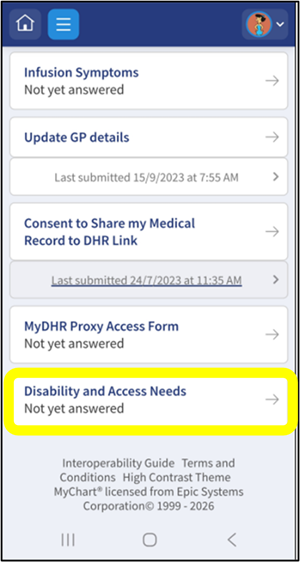
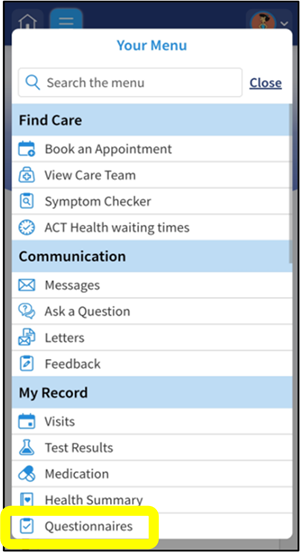
The MyDHR App is powered by MyChart® licensed from Epic Systems Corporation, © 1999 – 2026.
The “Different needs, same rights” banner
You may also see a "Different needs, same rights" banner on your MyDHR home page. You can use this banner to access the questionnaire and tell us about your access needs.
- Log in to MyDHR using the app or website.
- Find the “Different needs, same rights” banner. If you cannot find the banner, follow the steps on Page 3.
- Select “Tell us what you need”.
- Answer all required questions.
- Review your responses, then click ‘submit’.

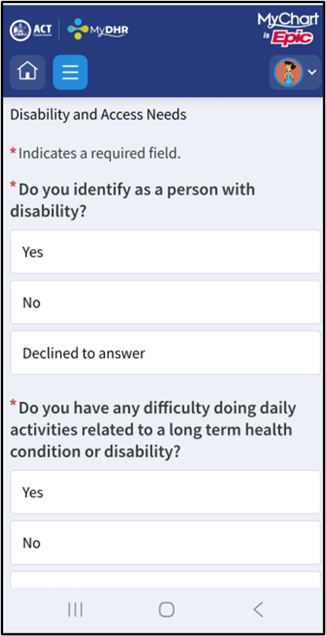
The MyDHR App is powered by MyChart® licensed from Epic Systems Corporation, © 1999 – 2026.